Multiple Execution Targets
Local runspace, isolated local process, remote machines and full impersonation — pick the right isolation and identity for every job.
PowerGate controls how PowerShell runs in your organisation — whether you're delegating helpdesk tasks, reacting to infrastructure events, or watching and executing across network boundaries. Self-service portal, approvals, full audit trail, remote engines, and event-driven automation in one platform. No shared admin passwords, no open consoles.
Every IT team has powerful PowerShell scripts. The problem is letting people run them safely. Today that usually means handing out admin consoles and shared credentials, or funneling every routine task through a handful of senior admins. PowerGate is the controlled gateway in between.
The result: you delegate work down, cut ticket turnaround, remove standing admin rights, and pass audits — while your experts stop being a human API for routine requests.
PowerGate solves different problems depending on your environment — pick the one that looks familiar.
Level-1 staff can't run scripts safely, so everything queues up with the people who know PowerShell.
Windows event log errors, files dropped into folders, monitoring alerts — all need a human to notice and act.
Segmented sites, client networks, OT/IT boundaries — each with its own events to watch and scripts to run.
Air-gapped networks, classified infrastructure, regulated industries. Most tools fail the first filter.
PowerGate sits between your PowerShell scripts and the people who need to run them — enforcing identity, least privilege and a complete audit record on every execution.
A quick look at PowerGate from the helpdesk operator's seat — and from the admin's.
Select an action, enter parameters, execute — full output, no console, no admin credentials.
Every run recorded — who ran it, what parameters, full output. The control layer your audit requires.
There is a lot more to explore — approvals, logic flows, scheduling, credentials, remote engines and AI integration.
Let's talkEverything you need to operationalize PowerShell automation at enterprise scale.
Local runspace, isolated local process, remote machines and full impersonation — pick the right isolation and identity for every job.
Granular roles decide who can see and run each action. Your helpdesk runs exactly what you allow — and nothing else.
Chain script actions into multi-step flows with conditions and branching — orchestrate real processes, not just single commands.
Cron-based schedules for recurring automation — backups, clean-ups, reports — running unattended and fully audited.
Push execution out to remote engines across sites and networks. Engines also act as event sensors — they watch Windows Event Logs and file system folders, and automatically fire script actions the moment something happens. All managed centrally from one PowerGate control plane.
A knowledgeable teammate that understands your scripts, your runs and your environment. Ask it what's going on, have it look into a problem and explain it, or get it to draft new automation for review — secure, permission-aware and fully recorded. Works with Claude and other AI assistants.
Store secrets encrypted, pull from external sources, and run as service or domain identities — without ever exposing passwords.
Every execution, change and approval is logged with output, duration and operator — complete accountability and traceability.
Connect Git repositories — cloud or on-prem — and file-based shares. The sync scheduler pulls changes automatically and creates or updates the matching script actions from each script's metadata, so your action catalog stays in lockstep with your source of truth.
Require human sign-off before sensitive actions execute. A request sits in a dedicated approval queue until an authorised approver accepts or rejects it — separating the person who asks from the person who allows, with a full record of every decision.
Turn free-text fields into live dropdowns populated from Active Directory, a CMDB, a REST API — any source your scripts can reach. Define a short PowerShell script once and bind its output to any Script Action or Logic Flow with a simple token — no typos, no stale lists.
Run PowerGate as an active/passive cluster backed by SQL Server. If the primary node fails, a standby takes over automatically — no single point of failure, no manual intervention, no lost runs.
Remote Engines don't just run scripts. They watch your infrastructure and react — Windows Event Logs, file system folders, or both. An event on any machine can trigger automation that runs anywhere.
One event on Engine A triggers Core to dispatch simultaneously to any number of engines — each Script Action runs on its own configured target. One sensor, unlimited executors.
Write small, single-purpose script actions and chain them into bigger automations — each step a reusable building block you can drop into any flow. Add conditions, branching and foreach loops to keep even complex processes readable and maintainable.
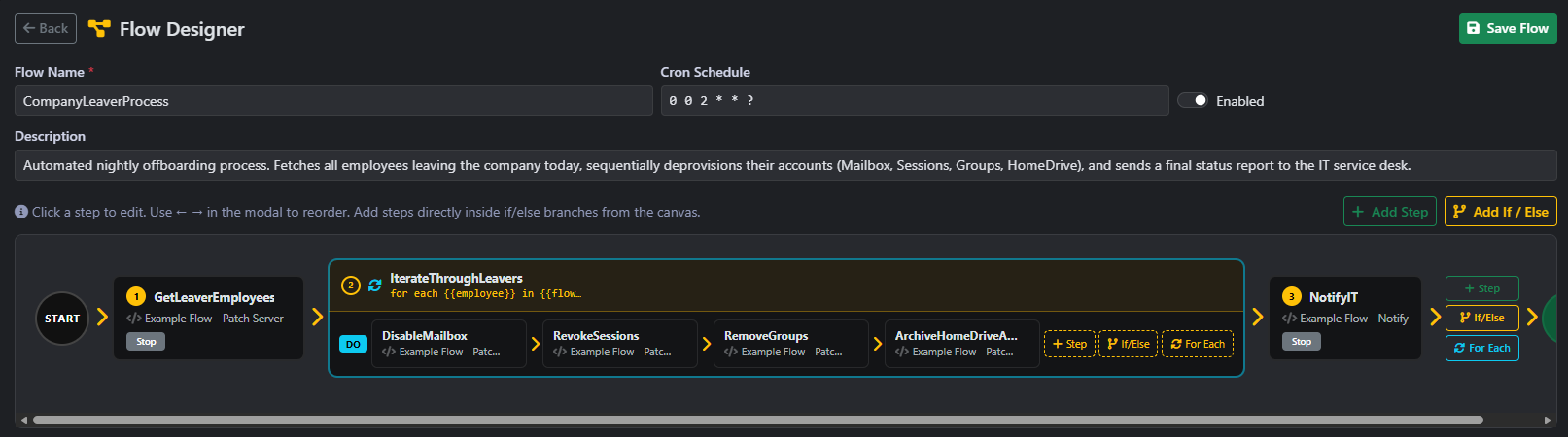
Above: an Employee Leaver process built from reusable steps. One action fetches everyone leaving today; a foreach loop then runs the off-boarding steps for each person — wired together once, audited on every run.
Write a script action once and use it across many flows. Improve or fix it in one place, and every flow that depends on it benefits.
Each step runs and is logged on its own, so you see exactly which step failed and its output — not one tangled log to dig through.
The whole process is laid out visually and audited step by step — it's clear what runs, in what order, and against whom.
The built-in Visualize tab maps the full dependency graph of any Script Action — credentials, repositories, triggers, notifications, approval gates and dynamic parameter scripts — in one view.
Every Script Action carries a live dependency graph built from its actual configuration — no manual documentation required.
Most AI tools know nothing about your infrastructure. The PowerGate AI Colleague is different — it connects directly to your PowerGate instance and has real context: your scripts, your execution history, your audit trail, your environment. So when you ask it something, the answer is actually about you.
"Why did the backup job fail at 2am?" — the AI reads the actual run log, the script content and the error output, then explains the root cause in plain language. No digging through logs yourself.
"Write a script that checks disk space on all domain controllers and alerts if below 10%." — the AI knows your existing catalog, naming conventions and credential structure, and submits a draft Script Action for admin review. You approve before anything runs.
"What ran last night and did anything need attention?" — the AI queries your execution history and gives a plain-English summary. Useful for handovers, Monday morning checks, or answering an auditor without hunting through logs.
MCP is an open standard — developed by Anthropic and now adopted across the industry — that lets AI assistants connect securely to external tools and live data. PowerGate runs as an MCP server, exposing your scripts, runs, audit trail and environment through a governed, permission-aware interface. Your AI assistant talks to PowerGate directly — no copy-pasting logs, no manual context, no hallucinated answers about systems it has never seen.
The AI signs in as a dedicated, controlled account — not as an admin, not with elevated rights. You decide exactly what it can see and do.
The AI respects the same role-based access controls as human operators. It only sees scripts and runs that its role permits — nothing more, nothing less.
When the AI creates or modifies something it submits a draft for a human to approve. It adds insight and speed — not autonomy. Every interaction is fully audited.
PowerGate connects to your existing systems — your service desk, monitoring, identity and more — so automation happens where your work already does, not in yet another silo.
Run the right action straight from your service desk — ServiceNow, Jira and others — and turn a ticket into a safe, automated fix.
Let an alert from your monitoring kick off the right response automatically — fewer wake-ups, faster recovery.
Let people sign in with the company accounts they already use — Microsoft Entra ID (OIDC) or Windows / Kerberos single sign-on on the corporate network. Local accounts keep working too, so admins are never locked out.
Keep email, chat and your other tools in the loop whenever something runs, needs approval or finishes.
Everything PowerGate does is available through a documented API — automate it, query it, or build it into your own apps.
PowerGate sends webhook notifications to your tools when actions run, need approval or finish. Inbound automation always goes through the authenticated REST API — every request signs in as a user or integration account.
Let your scripts call OAuth-protected APIs — Microsoft Graph, Exchange Online and more — with no secrets in the script. PowerGate mints a fresh access token at run time and injects it securely, so automation can act across your cloud services without ever exposing a credential.
Machine-to-machine access for your own apps and systems — issue scoped API tokens so external tools can trigger Script Actions and Logic Flows securely, without a human login or a shared password.
A comprehensive REST API exposes the whole platform — trigger automation from HR onboarding, drive PowerGate from your own portal, or wire it into the systems your business already relies on.
An honest look at how a purpose-built ZTEG stacks up against the common ways teams run scripts today.
| Capability | PowerGate | Manual scripts & remote access | Automation / RMM platforms | Per-seat delegation suites |
|---|---|---|---|---|
| Purpose-built for governed PowerShell execution | ✓ | ✕ | ~ | ✓ |
| Self-service for staff without sharing admin credentials | ✓ | ✕ | ~ | ✓ |
| Built-in approvals & complete audit trail | ✓ | ✕ | ~ | ~ |
| Bundled PowerShell 7 — nothing to install on hosts | ✓ | ✕ | ✕ | ~ |
| Runs fully air-gapped / offline, no telemetry | ✓ | ✓ | ✕ | ~ |
| Distributed remote execution, centrally managed | ✓ | ✕ | ✓ | ~ |
| AI assistant that understands your scripts & runs | ✓ | ✕ | ✕ | ✕ |
| Open REST API + ITSM / SSO integration | ✓ | ✕ | ✓ | ~ |
| Simple, predictable licensing (flat core + add-ons) | ✓ | — | ~ | ✕ |
This compares common characteristics of each category, not any specific product — individual tools vary. The point isn't that alternatives can't do these things; it's that PowerGate does all of them in one place, with simple, predictable licensing.
PowerGate runs entirely on-premises and needs no connection to the internet — ever. It's a natural fit for air-gapped, classified and security-critical environments where nothing is allowed to phone home.
One core server with every feature, extended by per-unit add-ons as you grow.
| Capability | Core Server | Remote Engineadd-on | AI Assistantadd-on |
|---|---|---|---|
| All execution targets (runspace, process, impersonation) | ✓ | — | — |
| Logic flows, scheduling & recurrence | ✓ | — | — |
| RBAC, audit log, approvals & notifications | ✓ | — | — |
| Credential vault & external credential sources | ✓ | — | — |
| OAuth API connections (Graph, Exchange & more) | ✓ | — | — |
| Dynamic parameter scripts (live dropdowns) | ✓ | — | — |
| Concurrent workers | 5 included | — | — |
| Script actions | 50 included | — | — |
| Execute on additional remote machines | — | ✓ per engine | — |
| Central management of distributed engines | requires core | ✓ | — |
| Windows Event Log monitoring & triggers | — | ✓ | — |
| File system folder watching & triggers | — | ✓ | — |
| Event data injected as script environment variables | — | ✓ | — |
| High availability (active/passive clustering, SQL Server) | ✓ SQL Server required | — | — |
| AI colleague: ask about scripts & runs, draft new automation | — | — | ✓ per assistant |
| Secure sign-in & permission-aware AI access | requires core | — | ✓ |
Add-ons are licensed per unit (per remote engine, per AI assistant) and require an active Core Server license.
One annual core license, plus add-ons exactly where you need them. All prices are per year.
The complete PowerGate platform with every feature.
Execute scripts and sense events on remote machines and sites — managed from one control plane.
An AI teammate that knows your scripts, runs and environment.
* Requires a separate AI assistant subscription (e.g. Claude or Copilot), billed by that provider.
Add to quoteHit the included limits? Expand the core without changing platforms — capacity packs are quoted to fit your scale.
Add exactly the number of script actions you need — sized to your catalogue, not a fixed bundle.
Add as many worker slots as you need — just like extra Script Actions, choose the number that fits your workload.
Core server is always included. Add the engines and AI assistants you need.
PowerGate turns expert-only tasks into safe self-service and automation. Estimate the time it gives back to your team.
Figures are an indicative estimate based on the values you enter. The PowerGate cost mirrors the configuration above — type your own quote to override it.
Prices are per year, exclusive of applicable VAT. The AI Colleague add-on enables the integration with PowerGate — the AI assistant itself (e.g. Claude or Copilot) is a separate subscription billed by that provider. Multi-year pricing available on request.
Everything teams usually ask before rolling out PowerGate.
PowerGate is self-hosted software that runs on your own Windows infrastructure — on-premises or in your private cloud. It installs as a managed service, stores its data in SQLite or Microsoft SQL Server, and is administered entirely through a web portal. There are no external dependencies, so it sits inside your network and your existing change-control processes.
Every action is governed by role-based access control, so operators only see and run what their role permits — never raw consoles or shared administrator credentials. Sensitive operations can require approval before they execute, separating the person who requests work from the person who authorises it. Credentials are stored encrypted and used through impersonation, so passwords are never exposed to the people running tasks.
PowerGate records a complete trail of every execution, approval and configuration change — who ran what, when, against which target, and the full output. Combined with role-based access and approval workflows, this delivers the evidence and separation-of-duties controls that audited and regulated environments expect.
Yes. PowerGate requires no internet connection at any point — installation, licensing and operation are fully offline, there is no telemetry or call-home, and your scripts, data and logs never leave your network. That makes it suitable for air-gapped, classified, OT/ICS and data-sovereignty-constrained deployments.
PowerGate exposes a comprehensive REST API, so it fits into your existing toolchain rather than replacing it. You can trigger actions from your service desk or ITSM (such as ServiceNow or Jira), let monitoring alerts start automated responses, sign users in through Microsoft Entra ID and single sign-on, and push notifications to email and chat. Inbound requests are never anonymous: every call authenticates as a user or a dedicated integration account, and PowerGate sends outbound webhooks to notify your tools when work happens.
The optional AI Colleague operates within exactly the same permission model as everyone else: it signs in as its own governed identity, can only see and do what its role allows, drafts changes for human review rather than acting unilaterally, and every interaction is fully audited. It adds insight and speed without widening your attack surface.
PowerGate is licensed annually. One Core Server license (€5,490/year) includes the full platform with 5 concurrent workers and 50 script actions. You then expand precisely where needed — additional remote engines (€1,490/year each), AI Colleague seats (€539/year each), and capacity packs for more workers or script actions (on request) — without migrating or re-platforming. Add-ons require an active Core Server license. Note that the AI Colleague add-on covers the PowerGate integration only — the AI assistant itself (such as Claude or Copilot) is a separate subscription billed by that provider.
PowerGate started the same way most tools in this space do — with a daily frustration that nobody had quite solved. The developer behind it was working as a systems administrator, running the same PowerShell scripts day after day: resetting passwords, unlocking accounts, provisioning users, checking disk space. Not complex work — but work that required admin access, a console, and the right knowledge to do safely.
The options were to hand those scripts to helpdesk along with admin credentials, or to spend half the day fielding requests that should have been self-service. The available tools were either too heavy for a small team, too cloud-dependent for the environments in play, or simply not built with PowerShell as a first-class citizen.
So PowerGate was built — not to compete with Rundeck or ServiceNow, and not to become the next big enterprise platform. Just to solve the problem that was there every day: give the right people safe, audited access to the scripts that matter, without opening consoles or sharing passwords.
PowerGate is still exactly that. One person wrote it, knows every line of it, and answers every support email. That is not a weakness — it means the tool stays honest. It does what it says, it does not phone home, and it will not be acquired and turned into something unrecognisable. It exists because the problem is real, and the solution deserves to be done properly.
For the practical question every IT manager rightly asks: PowerGate stores everything in a standard SQL database you own outright. Your scripts, audit logs and configuration are plain files and plain data — never locked to a vendor, never held in a cloud account. If the developer disappeared tomorrow, your installation keeps running and your data stays yours.
— The PowerGate developer
PowerGate is self-hosted and licensed per installation. Onboarding is a short, guided process — you're never left to figure it out alone.
Get in touch and let us know you'd like to evaluate PowerGate.
A guided walkthrough of the platform tailored to your use case.
Map your targets, networks, security needs and which add-ons fit your setup.
Install the Core Server — and any remote engines — on your own infrastructure, with direct support throughout.
Share the location key generated during installation and your license is issued, including any add-ons.
PowerGate is up and running — fully governed, audited and ready for your team.
No public binaries to hunt down — the installation package is provided directly, signed and verifiable, as part of onboarding.
Describe your environment and get a tailored quote — core plus exactly the add-ons you need.